How can we help?
Guides for every Vibie feature, help with the Chrome extension, and a person to write to when you are stuck.
Browse guides by topic
See all 132 guidesChrome extension and websites
Let Vibie read and act in your Chrome tabs and on the websites you choose.
All 7 guidesConnected apps and approvals
Connect the apps you use and decide what Vibie may do without asking.
All 7 guidesMemory, skills and appearance
Teach Vibie once: what it remembers, the rules it keeps and how it looks.
All 15 guidesFiles, Canvas and Apps
Write beside your chat, keep your files, and build pictures, videos and Apps.
All 23 guidesTopics, Home and Schedule
Group your work by topic and let Vibie run tasks and follow-ups on time.
All 8 guidesAccount, billing and privacy
Plans and limits, your data, deleting your account and sending feedback.
All 7 guidesVibie in your Chrome tabs
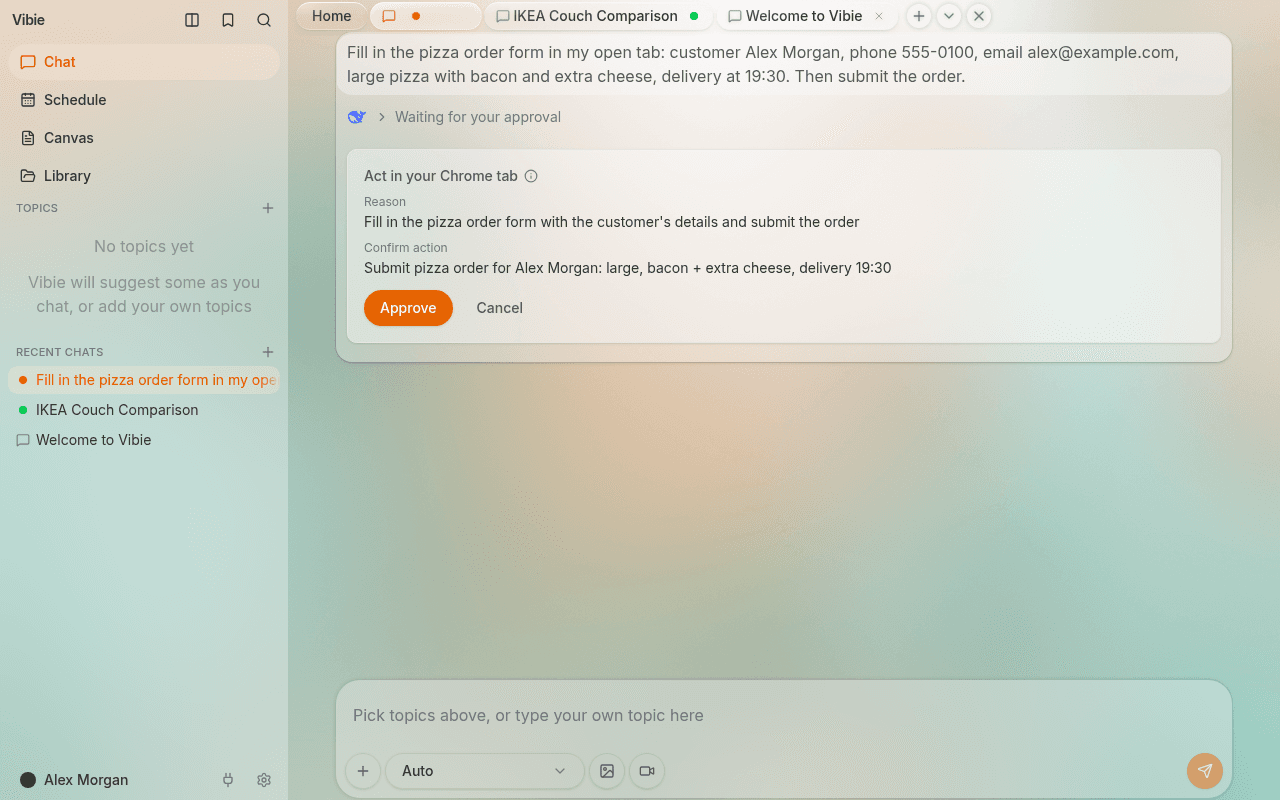
The Vibie Chrome extension lets Vibie list, read and act in the tabs you already have open, when you ask it to in a chat.
- Sign in to Vibie at vibie.ai.
- Add the Vibie extension to Chrome from the Chrome Web Store.
- Keep a Vibie tab open and ask about one of your tabs in a chat.
Vibie asks you in the chat before anything is sent, submitted, paid or deleted, unless you chose Always allow for that website (paying and deleting always ask). Click the Vibie icon in Chrome's toolbar to stop it at once.
Contact support
Write to us and a person on the Vibie team reads it and replies by email.
support@vibie.aiTo get an answer quickly, say what you did, what you expected and what happened instead, and add a screenshot if you have one.
From inside Vibie
Click your name at the bottom left and choose Send feedback, or press the thumbs-down under an answer that went wrong. You can also ask Vibie in any chat to send a message to the Vibie team.
Your account and data
Download a copy of your data or delete your account in Settings → Account. Requests by email are answered within 30 days. Read the privacy policy.
Common questions
Do I need the Chrome extension to use Vibie?
No. Vibie works in any browser at vibie.ai. The extension is only needed when you want Vibie to read or act in the tabs you have open in Chrome.
What does the Chrome extension read, and where does it go?
Only the tabs and pages you ask about in a chat. What it reads goes to Vibie to answer you and is never sold or used for ads. Details are in the extension privacy policy.
How do I stop Vibie while it works in a tab?
Click the Vibie icon in Chrome's toolbar, or press Stop in the chat. Vibie stops at once and does not retry.
Which plans are there, and what happens when I reach a limit?
See the plans and prices on the pricing page, and what each plan allows in the Plan Limits guide.
How do I download my data or delete my account?
Open Settings → Account in Vibie. You can download a copy of your data there or delete your account, which also removes your chats, files and memory.
An answer was wrong. How do I tell you?
Press the thumbs-down under the answer and pick what went wrong. For anything else, write to support@vibie.ai.